Vulnerability and Remediation Management
New Vulnerability Management Module
Vulnerability Management
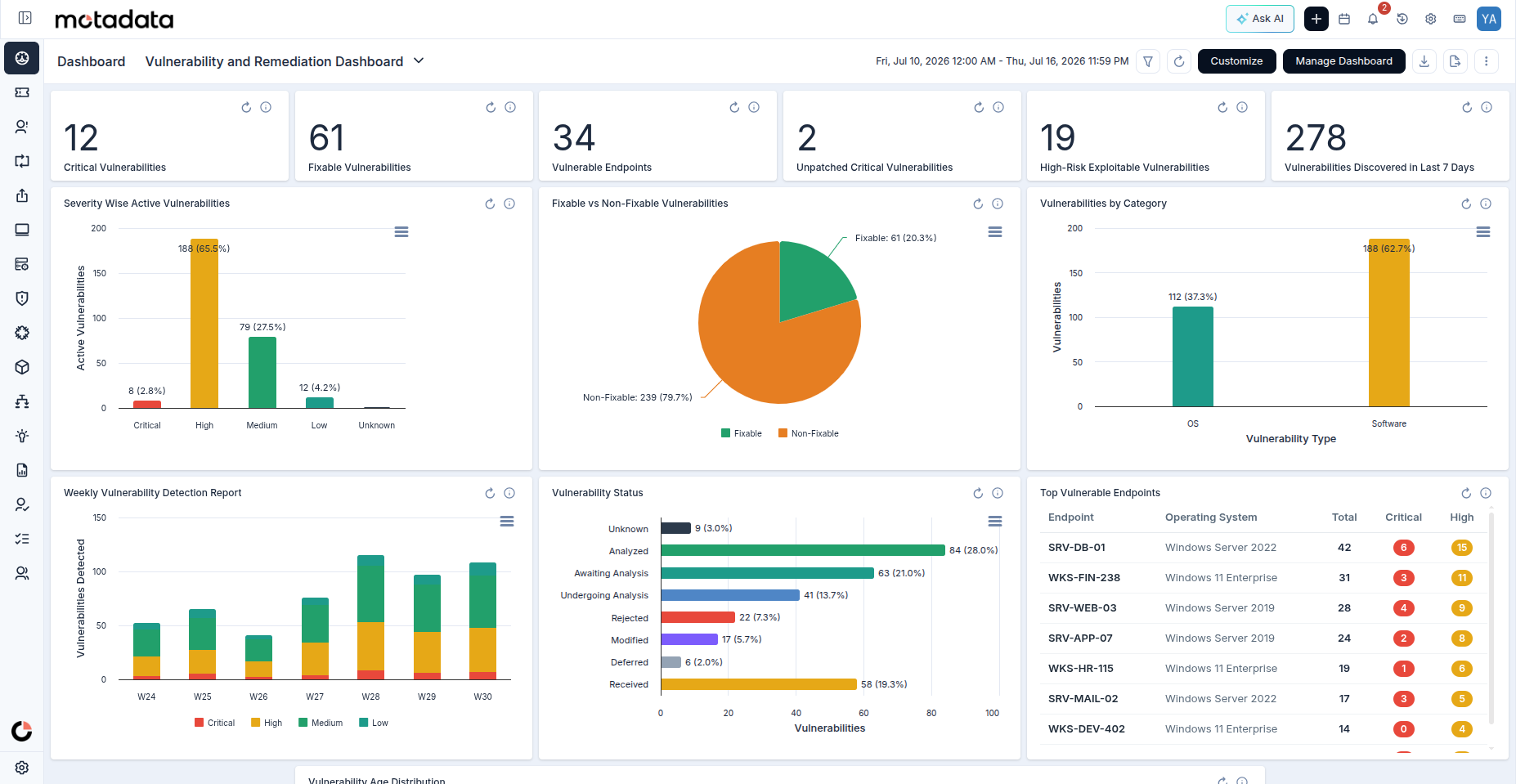
ServiceOps introduces a new Vulnerability Management module that gives IT and security teams a single place to detect, assess, and remediate vulnerabilities across managed endpoints. Teams relying on standalone scanners and spreadsheets face gaps between discovery and fix that leave endpoints exposed. Use it during routine security assessments, compliance cycles, and incident response across all agent-managed endpoints. The module covers vulnerability scanning, CVE detection, severity classification, remediation tracking, and direct integration with Patch Management for patch-based fixes.
Learn more in the User Guide
Organizations often manage this area through fragmented tools or manual processes, reducing visibility, consistency, and ownership.
The enhancement can reduce manual work, improve operational control, and help teams respond faster with better context.
OS Deployment
Comprehensive OS Deployment Management
OS Deployment Management
ServiceOps introduces a new OS Deployment Management module that lets IT teams create, manage, and deploy golden images to endpoint devices directly from the platform. Managing OS deployments without a dedicated tool means relying on manual processes or standalone imaging tools, making it difficult to standardize configurations and track outcomes across a fleet. Use it during device provisioning, re-imaging, and large-scale fleet rollouts, where a single golden image can be deployed to multiple endpoints in one operation. The module covers golden image creation, deployment policies, target computer selection, and deployment tracking. Role-based permissions govern all OS deployment actions.
Learn more in the User Guide
Organizations often manage this area through fragmented tools or manual processes, reducing visibility, consistency, and ownership.
The enhancement can reduce manual work, improve operational control, and help teams respond faster with better context.
Digital Signature
DocuSign Integration for Digital Signatures
ServiceOps now supports Digital Signatures through native DocuSign integration, enabling organizations to securely send, sign, and track business documents. Documents can be sent for signature directly from Service Requests, Changes, Purchase Orders, and Contracts, providing complete visibility into the signing process with a centralized audit trail and real-time signature status. Unlike a standard approval, Digital Signatures are designed for business processes that require a legally binding, authenticated, and verifiable signature, such as employee onboarding forms, policy acknowledgements, purchase approvals, and contracts.
A Digital Signature add-on license for at least one of the supported modules (Service Request, Change, Purchase, or Contract) is required.
Learn more in the User Guide
Key Enhancements:
- Signer Status Tracking: Real-time status via DocuSign Connect webhooks. Remind, Delete, and Ignore actions are available during the signing process.
- Document Download: Partial downloads are available at any time. Once complete, ServiceOps automatically stores the signed PDF merged with the DocuSign Certificate of Completion.
- Support Portal: Requesters can view signature status on the Support Portal Request detail pages when the Signature tab is enabled under Admin > Support Channels > Support Portal.
- Summary Reports: Summary Reports now include a Digital Signature Details column with Signer, Signer Status, and Signer Signed Time sub-columns.
- Remove Signature Details on Ticket Conversion: A Remove Signature Details option is now available when converting a ticket between types (Incident to Service Request, Service Request to Service Request, and Service Request to Incident). When selected, all digital signature details from the source ticket are removed before conversion, ensuring only signature templates applicable to the target ticket type are retained.
Organizations often manage this area through fragmented tools or manual processes, reducing visibility, consistency, and ownership.
The enhancement can reduce manual work, improve operational control, and help teams respond faster with better context.
Patch Management
Patch Deployment Reporting and Dashboard
Patch Deployment
Patch Managers can now generate Patch Deployment Reports to monitor the progress and status of each deployment on a scheduled or on-demand basis, and view results directly in a dedicated out-of-the-box Patch Deployment dashboard. The report provides visibility into deployment outcomes across endpoints, supporting both targeted reviews and broad fleet-level assessments. The dashboard comes pre-configured with the following widgets and KPIs, giving Patch Managers a complete deployment monitoring view immediately after setup.
Widgets:
Widget NameChart TypePurposeInstallation Status for Last 24 HoursColumnInstallation status counts per deployment updated in the last 24 hoursDownload Status for Last 24 HoursColumnDownload status counts per deployment updated in the last 24 hoursDaily Report for Patch Installation TaskColumnDaily count of patch installation tasks with In Progress or Ready to Deploy statusDaily Report for Severity Deployed Patch CountColumnDaily count of patches by severity for active deploymentsPatch Deployment Status Summary (Last 30 Days)PieDistribution of patch deployment statuses created in the last 30 daysPatch Category Distribution per Deployment (Last 7 Days)ColumnPatch categories per deployment ID created in the last 7 days
KPIs
KPI NameWhat It ShowsPatch Deployment Records Expiring This WeekDeployment records with an expiry date within the next 7 daysCompleted Patch Deployment Records (Last 7 Days)Deployment records with Completed or Partially Completed statusSuccessful Patch Installations (Last 24 Hours)Installations with status Success updated in the last 24 hours across all active deploymentsFailed Patch Installations (Last 24 Hours)Installations with status Failed updated in the last 24 hours across all active deploymentsPending Patch Installations (Last 24 Hours)Installations with status Yet to Receive or In Progress updated in the last 24 hoursCritical Failed Patch InstallationsCritical-severity installations that have failed across all active deployments
Patch Management Support for Third-Party Applications
Users can now perform patch management for the following third-party applications:
Serial NumberApplication1NCPA (Nagios Cross-Platform Agent)2AnyBurn3Delinea Connection Manager4DisplayCAL5Doxygen6Bandicut7Bandicam8Banyan9Bitfocus Companion10CatDV Pro11CatDV Server12CatDV Worker13Communicator (.EXE only)14Crypt-o (MSI only)15Go Programming Language16Hamachi17HomeBank18Icinga 219IdeaMaker20Ocenaudio (.EXE only)
Ubuntu 26.04 LTS Support for Patch Management and Discovery
ServiceOps now supports Ubuntu 26.04 LTS for both OS discovery and patch management. Endpoints running Ubuntu 26.04 LTS are discovered automatically and enrolled for patch scanning and deployment through the standard agent-based workflow.
Patch Management Support for macOS 26, SUSE 15.6, 15.7, and 16 server only
ServiceOps now supports patch management for macOS 26, SUSE 15.6, 15.7, and 16 server only.
Asset Discovery and Patch Management Support for Debian 13
ServiceOps now supports Debian 13 servers for both asset discovery and patch management. The agent is compatible with Debian 13, enabling hardware and software inventory collection and patch scanning and deployment through the standard agent-based workflow.
Organizations often manage this area through fragmented tools or manual processes, reducing visibility, consistency, and ownership.
The enhancement can reduce manual work, improve operational control, and help teams respond faster with better context.
Asset Management
Asset Discovery Support for SUSE Linux 15
ServiceOps now supports Asset Discovery for SUSE Linux 15.3 and earlier endpoints.
Fedora OS 44 Support for Discovery
ServiceOps now discovers endpoints running Fedora OS 44. Hardware and software inventory is collected automatically through the standard agent-based discovery workflow.
Organizations often manage this area through fragmented tools or manual processes, reducing visibility, consistency, and ownership.
The enhancement can reduce manual work, improve operational control, and help teams respond faster with better context.
Workflow and Automation
Key-Value Pair Support in Create Task Node
Create Task
The Create Task node in Workflow Automation now supports key-value pair inputs. This provides the same structured data entry available in module-specific Add Task configurations, removing the reference limitations of the previous form design.
Serial Number, IP Address, and Host Name Fields in Hardware Asset Workflow Actions
Create Asset
The Create Asset and Update Asset workflow actions now include Serial Number, IP Address, and Host Name fields when the asset type is set to Hardware Asset. These fields were previously unavailable in workflow configuration, requiring manual updates outside the automation flow.
Organizations often manage this area through fragmented tools or manual processes, reducing visibility, consistency, and ownership.
The enhancement can reduce manual work, improve operational control, and help teams respond faster with better context.
Admin and Configuration
Microsoft Graph API Support in Email-to-Ticket
Incoming email servers can now authenticate using the Microsoft Graph API, providing a modern, OAuth-based alternative to legacy SMTP and EWS connections for email-to-ticket processing.
Learn more in the User Guide
Admin UI Navigation and Layout Redesign
The ServiceOps Admin panel has been redesigned with an updated visual language, restructured navigation, frequently used modules, and a more intuitive information architecture.
Organizations often manage this area through fragmented tools or manual processes, reducing visibility, consistency, and ownership.
The enhancement can reduce manual work, improve operational control, and help teams respond faster with better context.